
Getting Started
How to classify verbatim responses against your own predefined codeframe using TruVerbatim.
Codeframe Classification takes your existing coding scheme – a structured list of themes with descriptions – and uses AI to classify every verbatim response against it. Instead of human coders reading each response and assigning a code, TruVerbatim does it for you, consistently and at scale.
Each response receives:
- A primary code matching the most relevant theme in your codeframe
- Secondary codes for any additional themes mentioned in the same response
- Automatic quality filtering to remove low-confidence assignments
When to Use Codeframe Classification
Use it when:
- You have an established codeframe from previous waves of research
- You need results to be comparable across time periods or markets
- Your client has specified exact themes they want coded against
- You are running a tracking study that requires consistent categories
Use Topic Discovery instead when:
- You are exploring the data for the first time
- You do not have a predefined list of themes
- You want to see what themes emerge naturally from the data
Before You Start
Preparing Your Codeframe
Your codeframe file should be a CSV or Excel file with at least two columns:
| Column | Required | Description |
| Theme name | Yes | The name of each code/theme (e.g. “Customer Service”) |
| Description | Recommended | A description of what belongs in this theme |
Example codeframe:
| theme_name | description |
| Customer Service | Mentions of interactions with support staff, call centres, help desks, or any customer-facing service experience |
| Product Quality | Comments about build quality, durability, reliability, or defects. NOT mentions of product features or design |
| Pricing & Value | References to cost, value for money, affordability, price comparisons, or discounts |
| Delivery & Shipping | Feedback about delivery times, shipping costs, packaging condition, or courier experience |
| Website & App | Mentions of the online shopping experience, app usability, checkout process, or website navigation |
Adding descriptions significantly improves accuracy. The more detail you provide about what each theme covers (and what it does not cover), the better the AI can match responses.
Preparing Your Verbatim Data
| Requirement | Detail |
| File format | CSV or Excel (.xlsx) |
| Text column | One column containing the verbatim responses |
| Metadata | Optional extra columns (age, region, gender) enable cross-tabulation later |
Step-by-Step Guide
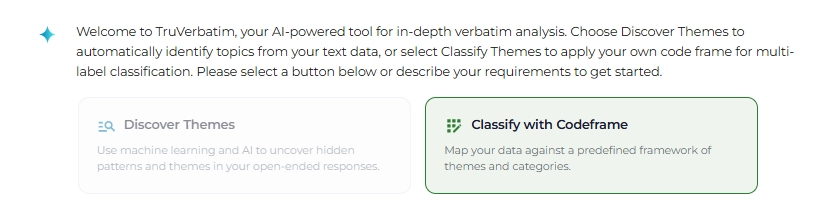
Step 1: Select Codeframe Classification
When starting a new analysis, select Codeframe Classification as your analysis type. This tells TruVerbatim that you will be providing your own coding scheme rather than discovering themes from the data.
Step 2: Upload Your Verbatim Data
- Drag and drop your CSV or Excel file onto the upload area
- Select the column containing your verbatim text
Optional: Enable auto-cleaning to remove personal information, profanity, duplicates, and blank rows.
The system will prepare your data, applying any cleaning steps you selected. Wait for the “data ready” confirmation before proceeding.
Step 3: Upload Your Codeframe
Once your verbatim data is cleaned and ready, a codeframe upload prompt appears automatically in the chat. You will see an upload area specifically for your codeframe file.
- Drag and drop your codeframe file (CSV, Excel, or Parquet format)
- The system detects the columns in your file automatically
- Select the theme column – which column contains your theme/code names
- Select the description column – which column contains the theme descriptions
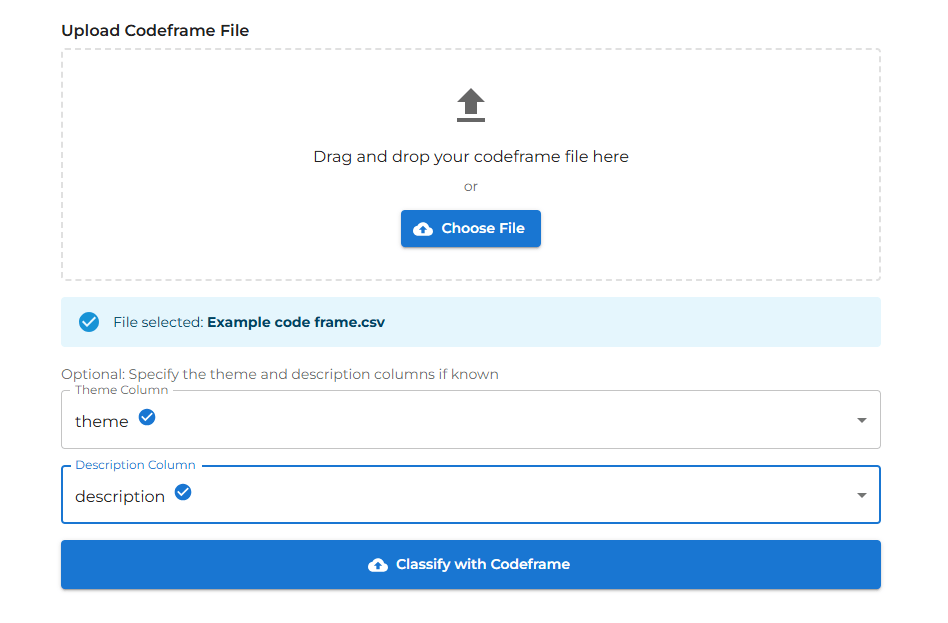
If your codeframe has only one column (theme names without descriptions), select the same column for both. Classification will still work, but descriptions improve accuracy.
Step 4: Start Classification
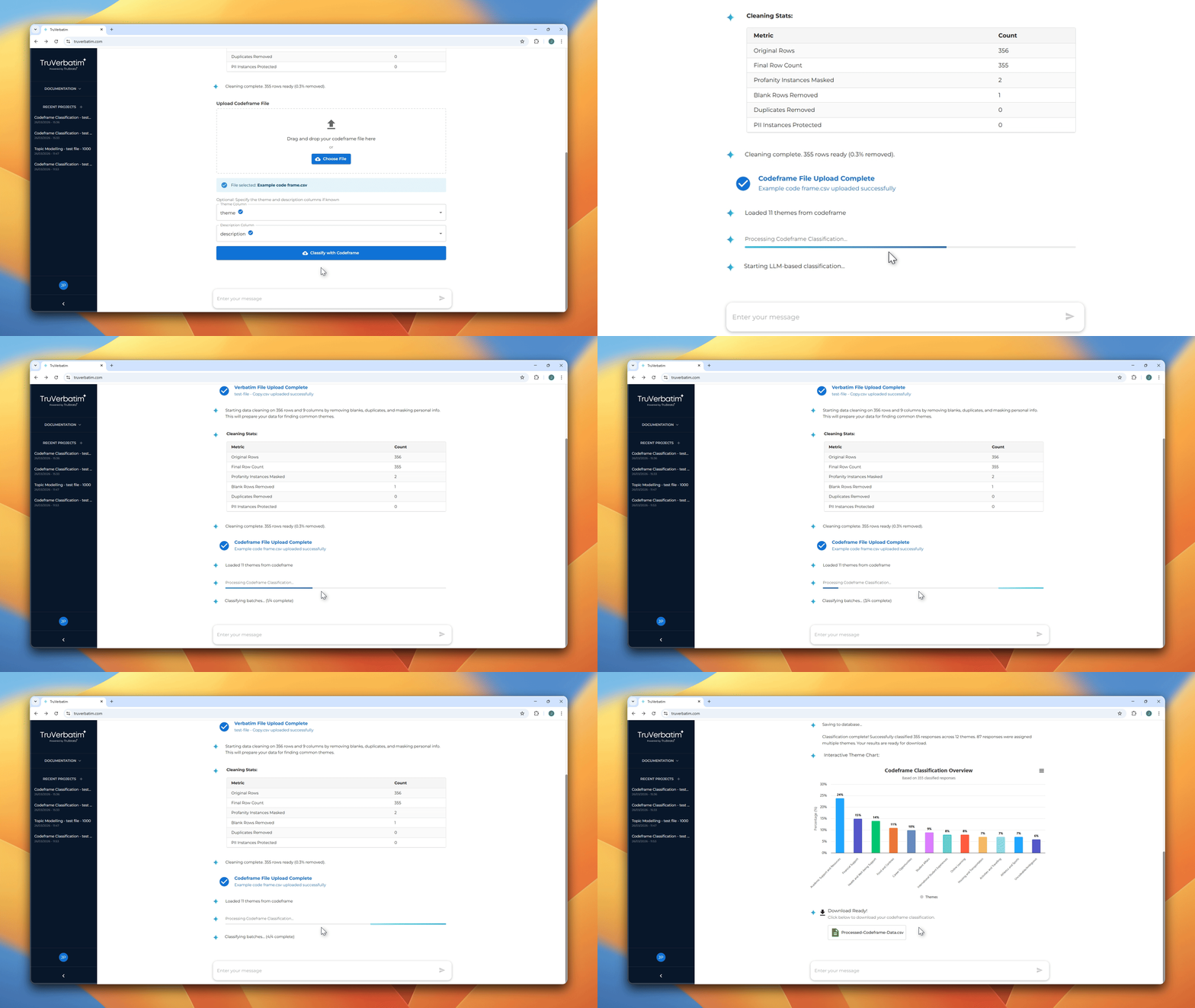
Click the Classify with Codeframe button. The classification begins automatically.
Real-time progress updates appear in the chat:
- Loading codeframe – your coding scheme is parsed and validated
- Preparing data – responses are organised for efficient processing
- Classifying – the AI processes your responses, with a progress percentage updating as it goes
- Validating – low-confidence assignments are automatically filtered out
- Correcting – any blank or invalid assignments are retried automatically
Step 5: View Your Results
When classification completes, the chat displays:
- Interactive bar chart – your codeframe themes ranked by the percentage of responses assigned to each
- Statistics summary – total responses classified, multi-label count, unique themes used
- Download button – click to download the full classified CSV
Chart interactions:
- Hover over any bar to see exact counts and percentages
- Export the chart as PNG, SVG, or PDF from the chart menu
Mention rank filtering (if applicable): If your verbatim data contained grouped columns that were unpivoted, toggle chips appear above the chart allowing you to filter by mention order (Total, 1st mention, 2nd mention, etc.).
Step 6: Download Your Results
Click the Download CSV button. The exported file includes:
| Column | Description |
| Original verbatim text | The response as uploaded |
| themes | Assigned theme(s) – comma-separated if multi-label |
| *Original columns* | All metadata from your uploaded file |
For single-label responses, the themes column contains one theme name. For multi-label responses, themes are comma-separated (e.g. “Customer Service, Product Quality”).
How It Works
Automatic “Uncodeable” Handling
The system automatically handles responses that do not fit any of your themes. Blank responses, gibberish, or text completely outside the scope of your coding scheme are marked as “Uncodeable/Ambiguous” rather than being forced into an inappropriate theme.
Multi-Label Classification
The AI assigns multiple themes where appropriate. Most responses that discuss more than one topic will receive 2-3 theme assignments. The AI only assigns a single theme when the response truly focuses on one specific topic.
Quality Filtering
After the initial classification, the system validates each assignment to check that it is a good fit. Low-confidence classifications are automatically removed, improving overall accuracy. If all assignments for a response are removed during filtering, it is marked as “Uncodeable/Ambiguous”.
Automatic Correction
Any responses left blank or assigned to a theme not in your codeframe are automatically retried. This typically recovers the vast majority of initially failed classifications, ensuring high coverage across your dataset.
After the Classification
Ask Questions
Type questions in the chat to explore your results:
- “Show me the top 5 themes by count”
- “What percentage were coded as Customer Service?”
- “Show me verbatims coded to Product Quality”
- “Show me a crosstab of themes by region”
- “Which themes have the most multi-label assignments?”
Generate PowerPoint
Click “Generate PowerPoint” to create a presentation deck with your classification chart and AI-written insight subtitles.
Export Charts
Right-click any chart to export as PNG, SVG, PDF, or download the underlying data as CSV or Excel.
Writing Better Codeframes
The quality of your classification depends heavily on your codeframe. Here are guidelines for getting the best results:
Be Specific in Descriptions
The description tells the AI exactly what belongs in each theme.
| Quality | Example |
| Vague | “Service” |
| Better | “Customer Service – Mentions of interactions with support staff, call centres, help desks, or any customer-facing service experience” |
| Best | “Customer Service – Mentions of interactions with support staff, call centres, help desks, or customer-facing service. Includes complaints about wait times, praise for helpful staff, and references to support channels. Does NOT include product complaints or delivery issues” |
Include Exclusions
Telling the AI what does NOT belong is just as valuable as telling it what does:
- “Product Quality – Mentions of build quality, durability, reliability, or defects. NOT mentions of product features or design”
- “Pricing – References to cost and value. NOT mentions of promotions or marketing”
Keep Themes Distinct
Overlapping themes confuse the AI just as they would confuse a human coder. If two themes are hard to distinguish, consider:
- Merging them into one broader theme
- Adding explicit boundary descriptions to clarify where one ends and the other begins
Limit Codeframe Size
While TruVerbatim handles large codeframes, classification accuracy tends to be highest with 10-30 themes. If your codeframe has 50+ themes, consider whether some can be grouped into parent categories.